Google Keep to Notion Migration Tool
The complete, secure solution for how to export Google Keep to Notion. Easily import Google Keep notes into Notion with attachments, tags, colors, and formatting fully intact.
How to Export Google Keep to Notion in 3 Simple Steps
NoteHopper is a zero-config Google Keep to Notion migration tool that does not need your Google password. You remain in total control of your data via Google Takeout. Your notes never touch our servers.
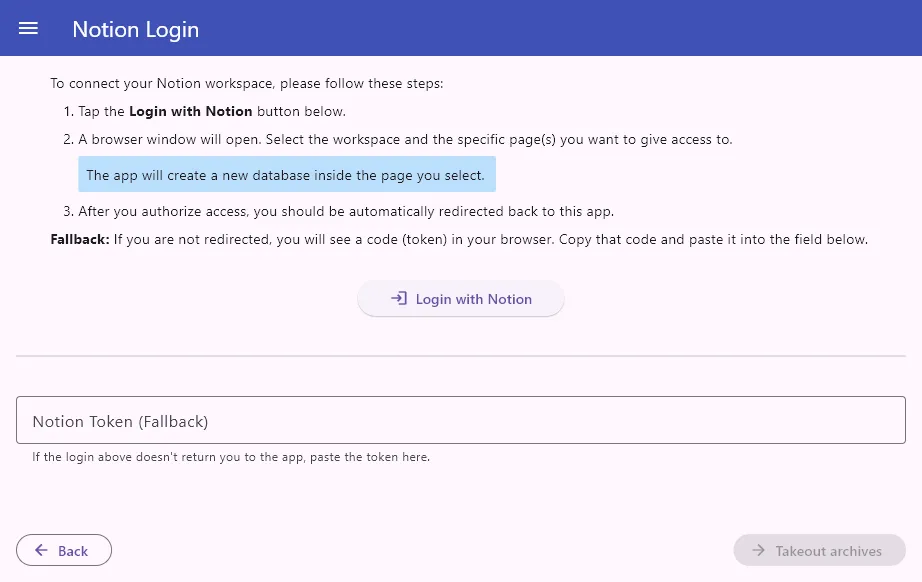
1. Login to Notion
Just press the Notion login button to connect to your workspace via your web browser. Then, select a Notion page where the Keep notes will be added.
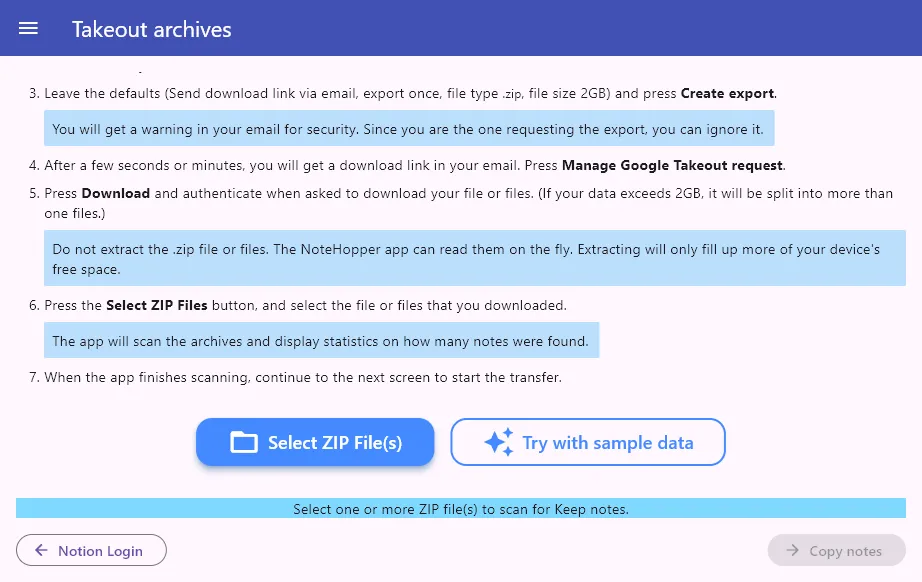
2. Upload Takeout Archive
Use Google Takeout to download a
Keep archive. Once you receive the .zip
archive via email, simply open it in NoteHopper.
No need to unzip anything!
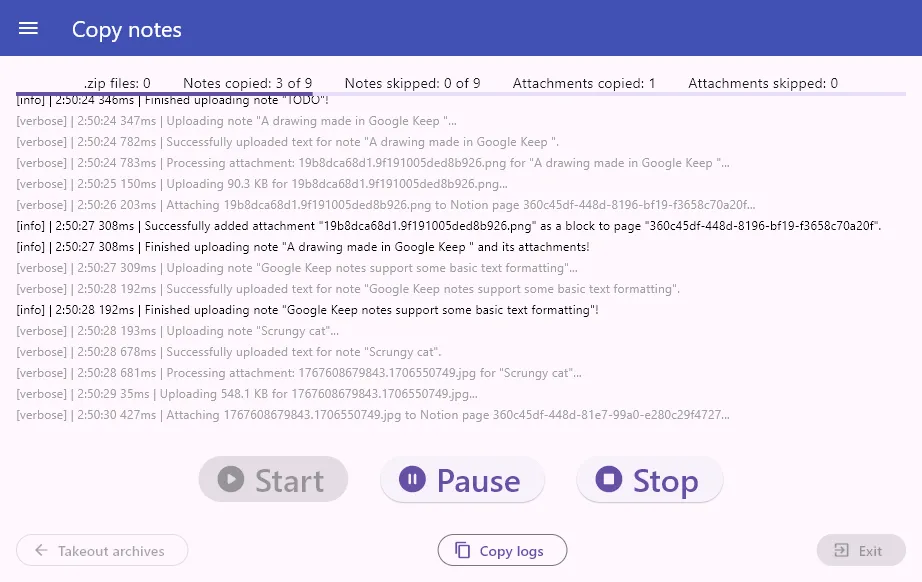
3. Copy Your Notes
Press Start and watch as your data is uploaded to Notion. NoteHopper begins the transfer, preserving your formatting, attachments, labels and timestamps perfectly. You can Pause and Resume the transfer at any time.
Advanced Note Filtering
Don't want everything? NoteHopper Pro users can filter notes by Labels or status (Pinned, Archived, or Trashed) before the sync begins.
Intelligent Attachment Squashing
Using the free Notion plan? Notion doesn't allow you to upload attachments over 5MB in size. But NoteHopper Pro users can choose to auto-squash images, photos and audio to under 5MB with minimal loss of quality.
Features
| Feature | FREE | PRO |
|---|---|---|
| Copy text notes, list notes, and formatting | ✔ | ✔ |
| Copy image attachments and drawings | ✔ | ✔ |
| Copy audio notes | ✔ | ✔ |
| Copy bookmarks/links | ✔ | ✔ |
| Copy labels | ✔ | ✔ |
| Copy Pinned & Archived status | ✔ | ✔ |
| Copy note colors | ✔ | ✔ |
| Retry failed uploads (e.g. if Wi-Fi signal is poor) | ✔ | ✔ |
| Copy more than 1000 notes in one go | ✘ | ✔ |
| Filter notes by Labels, Pinned, or Archived | ✘ | ✔ |
| Auto-squash attachments to under 5MB | ✘ | ✔ |
Ready to take the leap?
Download NoteHopper FREE and transfer up to 1000 notes per run.
Or pay once to download NoteHopper PRO, for unlimited use and extra features.





NOTE: On Windows, if unable to install, please use this certificate. Learn more...
Frequently Asked Questions
Everything you need to know about the migration process.
Can I import Google Keep notes into Notion with attachments?
Yes! NoteHopper is specifically designed to import Google Keep notes into Notion with attachments. Whether it's embedded images, photos, drawings, or audio recordings, NoteHopper uploads all of them. For users on Notion's free plan, NoteHopper Pro even includes an intelligent attachment squashing feature that automatically compresses files to stay under Notion's 5MB limit.
How to export Google Keep to Notion?
Exporting Google Keep to Notion with NoteHopper is easy:
- Request and download your notes archive from Google Takeout.
-
Open the downloaded
.zipfile in the NoteHopper Google Keep to Notion migration tool. - Connect your Notion account and select the page to import your notes into.
- Press Start to begin migration.
Do I need to extract the Google Takeout ZIP files?
What happens if my Takeout data is split into multiple files?
Is my Notion data safe?
Is my Keep data safe?
Why is the installer not installing (the install button is disabled)?
-
NoteHopper Free is available as a signed package from the Microsoft Store. To install it, just click on the store link. Alternatively, to install via the PowerShell, type:
winget install notehopper
-
But if you have downloaded NoteHopper Free via the direct download link, OR
NoteHopper Pro via the LemonSqueezy platform, then these packages are not signed by the Microsoft Store. Instead they are protected with a self-signed certificate with my name on it. Before installing, please download this file, right click on it, and select "Install". Then, simply run the app's installer again to install NoteHopper.
What happens if an upload fails due to poor Wi-Fi signal?
What happens if an attachment is over 5MB?
How does NoteHopper handle my audio recordings?
Google Keep audio recordings are usually saved as .amr or .3gp files, which are not suitable for use in Notion
audio blocks. NoteHopper uses ffmpeg to convert these into MPEG-4, a format that is accepted by Notion
audio blocks.
Can I import notes that I have previously deleted in Google Keep?
Yes, if it is in your Trash folder. If you choose to copy Trashed notes, NoteHopper will import them directly into the trash of your Notion workspace. This feature is exclusive to NoteHopper Pro users.
OK I transferred my notes! Now what?
After checking to see that your notes were copied, you can delete the downloaded Keep Takeout archive, since it is taking up some space on your device. You can also delete the private integration from your Notion account.
Is this app vibe coded?
While I have used generative AI to help me develop parts of the app faster, I have thoroughly tested every line that went into it. This is not "AI slop". I feel this needs to be stressed in this day and age. Your data is safe. I take full ownership of this product. In any case, if you spot any issues/defects either with the FREE or the Pro app, contact me.
Who are you, internet stranger?
I am Alexandros Georgiou, a software engineer from Athens, Greece.
If you have another question not listed here, please contact me.